CCE Codebook
Everything about how CCE works — out in the open. This is our full reference for registration, matchmaking, scoring, prizes, payouts, event cancellations, rules, and how we handle cheaters. If a player could ask it, the answer lives here. For the binding legal versions, each section links to the official Terms, Privacy, Refund, Acceptable Use, and Cookie policies.
Type to filter. Click any question to expand the answer.
No entries match your search. Try a different term, or ask us on Discord.
Getting Started
CCE (Competitive Core Esports) is an Apex Legends competitive matchmaking platform. We run two queue formats — Solo Queue and Team Queue — across scheduled queue sessions. Solo Queue is strictly solo, while Team Queue supports solo, duo, and trio entries. Each event or queue session shows its format right in its name, so you always know which one you're joining. Instead of traditional bracket tournaments, we run recurring, structured queue events with automated private lobbies, MMR-based matchmaking, leaderboards, and prize opportunities.
Not in the traditional sense. CCE is primarily a competitive matchmaking platform with scheduled queue events and leaderboard-based results. It is tournament-adjacent for players searching for Apex Legends tournaments, but CCE runs recurring queue sessions rather than traditional bracket registration.
You must be 16 years of age or older to use CCE. By using the platform you represent that you meet this requirement. CCE reserves the right to immediately terminate any account found to belong to a minor. See the Terms of Service for full details.
You need three things:
- A CCE account — sign up with your email and password, or sign in with Discord.
- An Apex Legends account — you self-submit your platform and in-game name during onboarding; we capture your UID automatically. There is no level or rank requirement.
- A verified PlaySafe ID to ready up and join matches.
Click Register and create your account with your email and password, or sign in with Discord. Then self-submit your platform and in-game name and complete your profile. Once your PlaySafe ID is verified, you can join eligible Solo Queue or Team Queue events from the Play page. The whole process takes just a couple of minutes.
You don't link or connect anything — there's no account attachment or API verification. During onboarding you simply self-submit your platform and in-game name, and CCE captures your UID automatically to identify you and build your matchmaking profile.
No. Creating an account and playing is free, and you can win real cash from the free prize pool without paying. An optional paid Premium membership unlocks a larger cash prize pool and other benefits. See Prizes, Premium & Payouts for details.
No. Each CCE account must be used solely by its registered Discord owner. Account sharing, buying, selling, or transferring is strictly prohibited and results in an immediate permanent ban. You are solely responsible for the security of your Discord account.
How Matchmaking Works
Players are routed into lobbies by the active queue format and their competitive rating (MMR). Both Solo Queue and Team Queue use balanced lobby construction to keep matches fair and competitive across skill ranges.
After a lobby is formed, teams are assembled according to the active format's rules. In Team Queue, solo, duo, and trio entries are combined into balanced trios. In Solo Queue, individual players are grouped into balanced trios each match.
Before teams are finalized, players are sorted through a set of filters — and beyond those filters, placement is randomized:
- Communication pool: players with a mic are pooled separately from players with no mic (or no comms).
- Language: players are separated by language, for example English and Spanish.
- Pro League sorting: Pro League players are sorted onto separate teams.
- Platform sorting: console players and PC players are placed on different squads.
Premium players can also use the Avoid feature to prevent queueing with a specific player.
MMR (Matchmaking Rating) is the cornerstone of competitive matchmaking. It determines the caliber of opponents you face, the difficulty of your lobbies, and the skill level of your teammates. Ratings climb through six tiers:
- Rookie — 0 MMR
- Contender — 1100 MMR
- Challenger — 1600 MMR
- Elite — 2100 MMR
- Ascendant — 2700 MMR
- Champion — 3400 MMR
Climbing from Rookie to Champion reflects your competitive growth and directly influences your path to facing elite competition and winning prizes.
When the lobby fills, a match pop-up appears and you have a short window to click Accept. Once accepted, your Match Dashboard opens with everything you need: your lobby code, team roster, map vote, and legend bans. Vote on the map, submit your legend ban preferences, then copy the lobby code and join the private match in Apex Legends.
Map voting is the first match phase, running automatically once all players accept:
- Each player gets one vote and can change it while the timer is active.
- The top-voted map wins.
- Ties or no votes fall back to rotation order.
Once voting finalizes, the selected map is applied to the lobby. If Legend Ban is enabled for that queue, that phase starts next.
After map voting concludes, all players vote on which legends to ban for that game:
- The vote window opens for 60 seconds.
- Each player can nominate up to 4 legends.
- When voting ends, final bans are drawn using a weighted draw — the more votes a legend receives, the higher its chance of being banned, but popular picks are not guaranteed to be removed.
Team Queue events are built for coordinated play. There's no separate registration — everyone just needs to be on the Play page when the queue opens, then form a party right there:
- 1. Go to the Play page. Party controls appear automatically when a Duo or Trio event is active.
- 2. Send an invite. Click "Invite Teammate," search by their Discord username, and hit Invite — they receive it instantly on their Play page.
- 3. Teammate accepts. They click Accept on their incoming invite, exactly like a party invite in any game, and join your party instantly.
- 4. Party leader readies up. Once the party is full, only the party leader (whoever sent the invite) clicks Ready Up, and the whole team enters the queue together.
Playing & Queues
Queue times vary by event type and day. The full monthly schedule is always available on the Schedule page — it lists every upcoming event with its start time, duration, and region. You can also see the active queue cards on the Play page for what's running right now.
Go to the Play page when a queue event is active and hit Ready Up to enter matchmaking. Your status updates live as the lobby fills. When it's full, accept the match pop-up, then use your Match Dashboard to vote on the map, set your legend bans, copy your lobby code, and join the private match.
Just wait for the queue to fill up. A match only pops once enough players are queued, and you'll get a match pop-up when it's your turn. You don't need to do anything while waiting — keep the page open and click Accept when the pop-up appears.
Our ladders run full games only. A match pops once at least 60 players are in the queue, and 57 of them must accept for the match to officially proceed to the setup phase — that's when you receive your lobby code.
Until then, everyone simply stays in queue and waits for it to fill. We never start short-handed games just to move things along or to help reach a ladder's minimum game count — every game stays a full, fair lobby.
If you don't click Accept within the window, you'll receive a temporary queue cooldown before you can queue again. This keeps lobbies filling smoothly for everyone else.
Matchmaking includes loss forgiveness: teams with missing players cannot go negative for that match, so you aren't punished for a no-show teammate. Persistent AFK or no-show behavior can be reported and may lead to penalties for the offending player.
Map rotation is announced per event window and may vary by queue format. Rotations are drawn from the current Apex Legends map pool (for example World's Edge, Storm Point, E-District, and Olympus). Before each match, players also vote on which map to play from the active rotation — the top-voted map wins, and ties or no votes fall back to rotation order. Check the schedule notes and your live Match Dashboard for the exact rotation in play.
Every game you play during the event window counts toward your session leaderboard position. Play as many matches as you want — the exact details for the active event are shown on each event card and leaderboard.
Region availability is set per event and shown on the queue card and schedule (for example NA, EU, and Asia windows). Check the active queue details for the regions running at any given time.
Scoring & Leaderboards
Every player starts fresh at the beginning of each queue event. You earn points from a combination of placement (how high your team finishes) and combat stats (kills and assists). The exact point values for placement, kills, and assists are shown live in the Competitive Point System panel — open the point breakdown to view the current values anytime.
When entry fees are enabled for an event, a fee is deducted from each game you play, scaled to your MMR tier. Higher-rated players pay the same flat per-game fee shown on the scoring panel. Entry fees keep the leaderboard competitive by rewarding consistent, high-value games.
Loss forgiveness protects you from being punished for a broken team: teams with missing players cannot go negative that match. Your worst-case score for a short-handed game is zero, not a loss.
Your session score combines placement and combat points from the games you play, minus any entry fees for that event. The leaderboard updates live as games are recorded, and final standings determine prize eligibility once the event concludes.
Prizes, Premium & Payouts
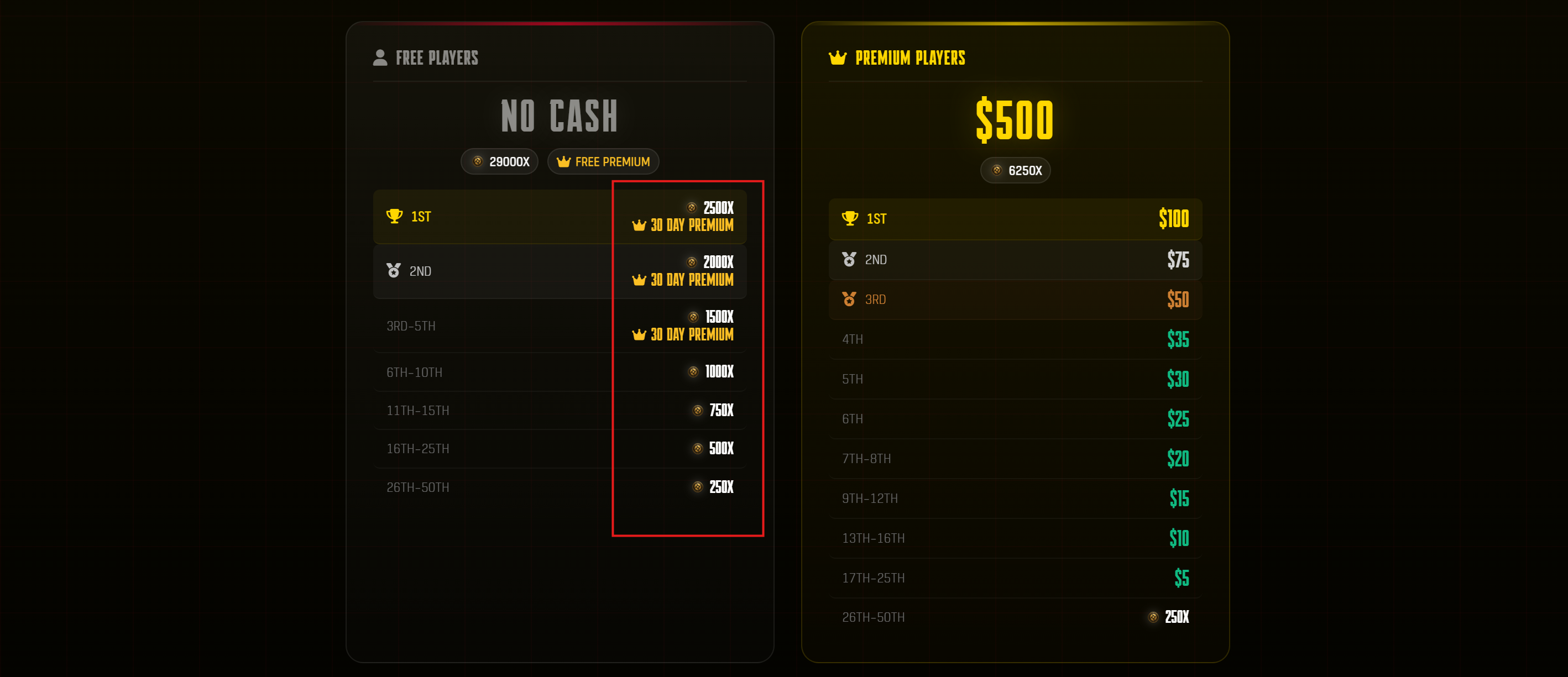
Everyone. Every event has a free prize pool that pays out real cash to top finishers — you can win money without paying anything, just sign up and play. Premium players compete for a larger prize pool with more paying places on top of the free pool.
Each event has a Free pool and a larger Premium pool. Both pools pay real cash to top finishers. The Free pool is open to everyone with no payment required, while the Premium pool offers larger awards and more paying places. Exact amounts and placements are listed live on each event's details.
Premium Membership is a recurring digital subscription priced at $15.99 per billing period. It delivers immediate access to Premium benefits, including the larger cash prize pool (free players still win cash from the free pool), Priority Queue, and Premium Support. You can subscribe after sign-up. See the Refund Policy for billing terms.
Payouts follow five steps:
- 1. Event concludes — the event ends and admins review results.
- 2. Prize added to wallet — approved winnings are added to your CCE wallet automatically.
- 3. Enter PayPal — add your PayPal email in your wallet settings.
- 4. Request withdrawal — request a payout of your balance.
- 5. Paid via PayPal — withdrawals are processed within 30 days of your request.
All sales are final. Once a Premium subscription period has begun, no refund is issued for that billing period, because Premium benefits are delivered immediately on activation. The sole exception is a documented duplicate charge or a verified payment-processor error, which we correct case by case. Full terms are on the Refund Policy page.
You can cancel at any time from your billing settings. Cancellation stops future billing, and Premium benefits end immediately. Cancelling does not entitle you to a refund of the current period.
Event Cancellations
CCE reserves the right to cancel any ladder or queue event at any point, at the sole discretion of our administrators. Here's exactly how cancellation works and what it means for prizes.
Yes. CCE reserves the right to cancel any ladder or queue event at any point, at the sole discretion of our administrators. Cancellations can happen for any reason, including (but not limited to) low player count, server outages, platform or Apex Legends technical issues, or anything else that prevents the event from running fairly.
No. A cancelled ladder does not pay out any money. If an event is cancelled, CCE is under no obligation to award or pay out its prize pool — including both the free and Premium prize pools.
For a ladder to even be considered complete, at least 8 games need to be played throughout the 4-hour ladder window. If fewer than 8 games are played, the event can be treated as cancelled, and no prizes will be awarded — or, at minimum, CCE is under no obligation to award those prizes.
Games only count once they meet the full-lobby requirement — matches are never started short-handed just to reach the 8-game minimum.
No. Event cancellations are not a basis for refunding CCE Plus subscription fees. Premium is a recurring subscription that delivers its benefits immediately on activation, and the no-refund policy continues to apply regardless of any event cancellation. See the Refund Policy.
End of the Month — $5000 Event
At the end of each month we run one big $5,000 event on the Play page. It plays exactly like a normal queue day — same start and end times as the monthly calendar — but the prize pool is far bigger and only players who have earned or been granted access to the $5,000 Event can ready up.
The total prize pool is $5000 for the day: $4000 in cash plus $1000 in product from our sponsor MOJHON.
It's a single 6-hour session, run just like any regular day on the schedule:
- 3 hours on EU servers, then 3 hours on NA servers — the exact times listed on the monthly calendar.
- Solo-queue only. No pre-made teams — everyone queues on their own and trios are formed automatically.
- Play as many games as you like across the 6 hours. Your top 6 games count toward the leaderboard, exactly like a normal day.
The event is capped at up to 200 qualified and invited players, filled through three paths:
- 60 via the Qualifiers ladder — the top 60 players on the Qualifiers (Premium) leaderboard for the month.
- 30 via the daily Pro Queue ladder — the top 5 finishers on each of the 10 scheduled Pro Queue days leading up to the event.
- 50 reserved for invited / VIP players.
There are three ways to earn a spot:
- Climb the Qualifiers ladder. The Qualifiers leaderboard counts points only for games you play while Premium is active. The top 60 players each month earn access.
- Finish top 5 on a Pro Queue day. Placing in the top 5 of the daily Pro Queue ladder on any of the 10 scheduled days earns access (the regular queue's daily ladder does not qualify).
- Get invited. Invited / VIP players and admin-granted access make up the remaining spots.
The Qualifiers leaderboard only counts games you played while your Premium was active. If you buy Premium after playing, those earlier games don't count. If your Premium lapses and you keep playing, those games don't count either. It lists every current Premium player, so you always know where you stand.
The full $5000 pool ($4000 cash + $1000 in product from MOJHON) is paid out on the day based on your final leaderboard placement. The exact payout table will be announced soon and is expected to reward roughly the top 20–30 players.
No. After the event, all end-of-month access is cleared so everyone starts the next month fresh and has to earn their spot again.
Rules, Fair Play & Cheaters
We run a zero-tolerance policy for toxicity. Harassment, hate speech, discriminatory language, slurs, or threats toward other players, CCE staff, or administrators are not tolerated and can lead to immediate suspension or a permanent ban.
CCE operates a zero-tolerance policy for cheating in any form. Prohibited conduct includes:
- Aimbots, wallhacks, macros, or any unauthorized third-party software that gives an in-game advantage.
- Exploiting bugs, glitches, or unintended behavior in Apex Legends or on the CCE platform.
- Collusion, match fixing, or deliberate manipulation of match outcomes or MMR standings.
- Smurfing, boosting, or cross-teaming.
Every match can be monitored by trained admins, and suspicious activity is investigated immediately. CCE administrators have full discretion to investigate suspected cheating and to immediately suspend or permanently ban any account, without prior warning, once cheating is determined to have occurred.
A banned account immediately loses access to CCE matchmaking and account benefits and forfeits any pending prize eligibility. No refund of any Premium subscription fees is issued upon a ban.
CCE's ruling on cheating violations is final and non-appealable. For non-cheating violations, enforcement follows a general escalation ladder, and you can raise questions through our support channels on Discord.
Our primary anti-smurf safeguard is PlaySafe ID, which enforces a one account per human policy: each real person can hold only one verified PlaySafe ID, and it can be linked to only one CCE account. Circumventing a ban or suspension by registering or using alternate accounts is itself a violation and leads to a permanent ban.
Report any rule-breaking directly on the platform using the report button on the Ranking Leaderboard or your Match Dashboard. You can also reach out through our Discord.
Accounts, Privacy & Data
PlaySafe ID is an important part of trusted CCE matchmaking. It verifies that players are real and in good standing before they Ready Up, helping prevent repeat offenders from returning under alternate accounts.
PlaySafe ID is CCE's identity and good-standing verification integration for trusted matchmaking. You create and access your CCE account with your email and password, or through Discord. PlaySafe is checked when you try to Ready Up.
CCE receives the verification status and account link needed to confirm that your PlaySafe ID is verified, active, and connected to only one CCE account. This helps keep suspended or repeat offenders from returning under alternate accounts. You can create or connect your PlaySafe ID during onboarding or from Profile Settings.
We keep data collection focused on what's needed to run matchmaking and payouts:
- Account data: your email address and username, plus a password hash — or, if you sign in with Discord, your Discord user ID, username, and avatar.
- Gameplay data: your self-submitted Apex Legends details (platform and in-game name), the UID we capture automatically, and match statistics from the games you play.
- Technical data: IP addresses, session data, request and authentication timestamps, and security logs.
- Session cookies only, used to keep you logged in.
Full details are on the Privacy Policy page.
Your data is used to calculate MMR and operate matchmaking, form trios and assign automated private lobbies, process prize payouts and verify winner identity before disbursement, authenticate you at sign-in, and send transactional emails (receipts, prize notifications, match results) as well as optional marketing emails.
No. CCE does not store payment card data. All card handling is performed entirely by the payment processor. We only receive the transaction confirmation and payer identity information needed to operate subscriptions, receipts, and prize records.
Strictly necessary session cookies only. They exist to keep you logged in and keep authenticated sessions working. We use no advertising cookies, no third-party tracking cookies, and no analytics cookies. Disabling cookies will prevent login, since signed-in sessions rely on session cookies. See the Cookie Policy for browser-by-browser management steps.
You'll receive transactional emails (purchase confirmations, subscription receipts, prize notifications, and match results) that are part of running your account. You may also receive marketing emails such as event reminders and platform updates — you're opted in by default and can unsubscribe at any time using the link in any marketing email.
You are solely responsible for the security of your CCE account. Use a strong password and enable two-factor authentication where available. If you sign in through Discord, protect that account too. Account sharing and selling are prohibited and result in a permanent ban.
This codebook is the plain-language guide. The binding legal versions live here: Terms of Service, Privacy Policy, Refund Policy, Acceptable Use Policy, and Cookie Policy. If anything here ever conflicts with those pages, the official policy pages govern.
Support & Contact
The fastest way is our Discord — use the support channel or open a support request on-platform. Our team helps with both Solo Queue and Team Queue issues.
For urgent, in-progress match problems, contact the active event admin or host listed in the queue details, or post in the support channel on Discord for the quickest response.
Open a support request on-platform or message us on Discord with the details. For payout questions, include your event and wallet details so we can look into it quickly. Remember that approved withdrawals are processed within 30 days of your request.